Egress Sinks
Egress sinks are destinations where data from devices can be routed. The platform supports many kinds of such destinations via a unified interface.
You can use egress sinks to:
- Run custom stream processing logic over the device data streams.
- Export the data from the platform to external systems.
- Build real-time applications, dashboards, and alerts.
Check out also the Stream Storage for other ways to consume data from the platform, which are more suitable for batch processing scenarios.
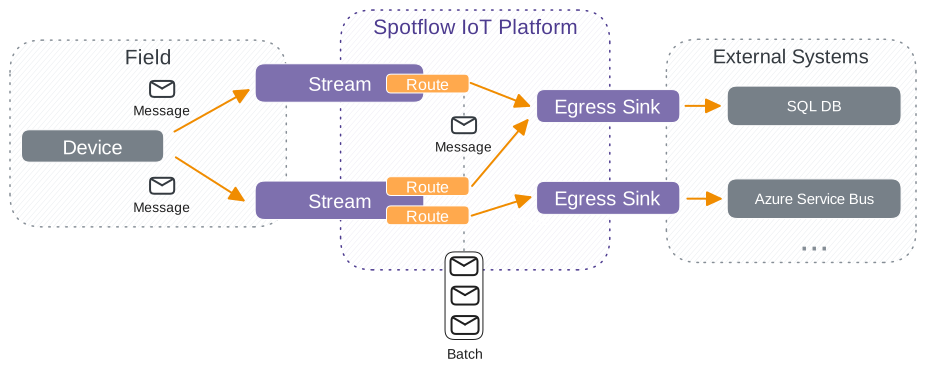
Each stream can be routed to one or more egress sinks. The link between a stream and an egress sink is called an egress route. Apart from specifying the target egress sink, the route can be used to customize routing behavior such as:
- What egress events are routed. Whether individual stream messages or completed batches should be routed.
- How exactly the data should be stored in the target egress sink. This is specific to each egress sink kind. For example for SQL, the mapping of the message to SQL table columns is defined at the route level.
Supported Egress Sink Kinds
The following egress sink kinds are supported:
- Azure Event Hub
- Azure Service Bus
- SQL Database
- Open Telemetry Endpoint
- Databricks Delta Table
- Includes first-class support for Open Telemetry data.
- Platform Stream
- Route messages to other streams within the same workspace.
- Built-in egress sink available in every workspace out-of-the-box.
Egress Route
The egress route defines to which egress sinks the data from streams are routed into.
The following guarantees are provided:
- One stream can be routed to multiple egress sinks.
- One egress sink can receive data from multiple streams.
- One route is related to exactly one stream and one egress sink.
- Data are routed to egress sinks in the order they are received from devices. Order is maintained within the context of a single stream and device.
- Data are routed to egress sinks after they are written in the stream storage.
Egress Events
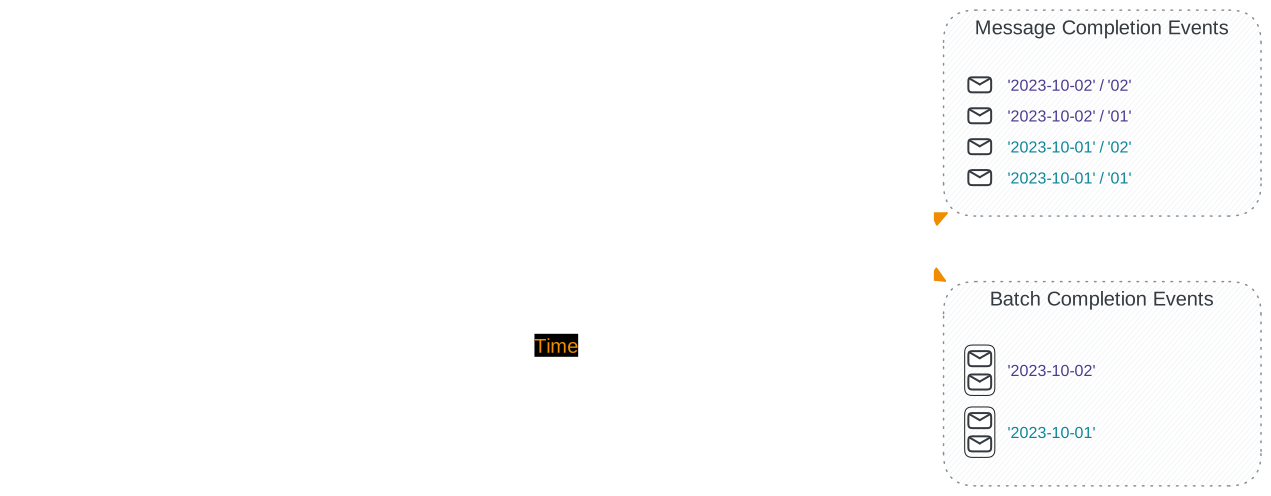
There are two types of events you can consume to process data from your devices: messages completion events and batch completion events.
Messages Completion Events
You can receive individual messages that the devices are sending. The events are emitted when a new message is received or when the last chunk of chunked message is received.
Messages discarded by Message Validation do not generate a Messages Completion Event and are not routed to connected egress sinks.
The event contains the payload and metadata of individual messages. Exact format of the event depends on the target egress sink. See Azure Event Hub for an example.
Batch Completion Events
You can receive notifications about completed batches. The event is emitted when a previously open batch is completed. Depending on the stream concatenation mode.
For streams that are concatenated, the event contains a link to all messages from given batch concatenated into a single blob in the stream storage. For not concatenated streams, there is link to the blob container in the stream Storage and folder (name prefix) for messages belonging to the completed batch. In both cases, additional metadata about the batch are available. Exact format of the event depends on the target egress sink. See Azure Event Hub for an example.
Raw event is another type of egress events. You cannot consume it directly but it is used to route from one stream to another within the same workspace. See Platform Stream for details.
Filtering
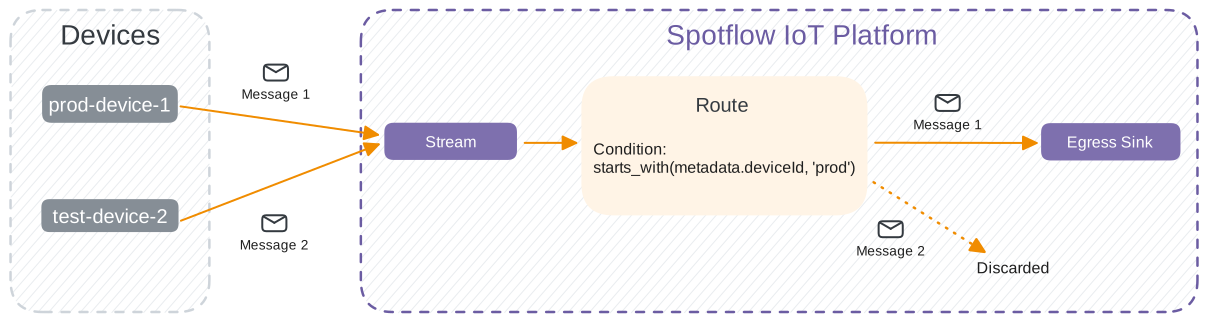
You can filter messages and batches routed to the egress sink by specifying a filter condition. If the condition evaluates to true, the event is routed to the egress sink. Otherwise, the event is discarded. All stream messages are persisted in the stream storage, regardless of the filter condition.
Syntax
The filter condition is an SQL-like expression that can reference the message or batch metadata properties. The condition can contain:
- logical operators
AND,OR, andNOT - equality operators
=and!= - operators
INandNOT IN - parentheses
(...) - variable references (e.g.,
metadata.deviceId) - function calls (e.g.,
fn(...)) - lambdas
arg => body, for example, inexistsfunction
Metadata Properties
The following metadata properties are available for both messages and batches:
metadata.deviceId: The device ID.metadata.siteId: The site ID. Optional, may not be defined.metadata.batchId: The batch ID.
Additionally, the following metadata properties are available only for messages:
metadata.batchSliceId: The batch slice ID. Optional, may not be defined.metadata.moduleId: The Module ID. Optional, may not be defined.metadata.messageId: The message ID.
Not present properties are treated as null value. Use the is_defined function to check if the property is defined.
Message Payload
In addition to metadata, a filter condition can reference the content of the message payload.
The only supported type of payload is OpenTelemetry Metrics. The payload is parsed and exposed through the otel_metrics variable. The data schema is available on GitHub. To access payload properties use the camel cased dot separated path, for array elements use the numbers without enclosing it into the brackets (e.g., otel_metrics.resourceMetrics.1.scopeMetrics.0).
Key points:
- The payload is only available for routes with message and raw events input. Batch completion events are not supported.
- Individual message chunks are not supported because the complete payload is not available until the last chunk is received.
- If the payload after decompression is larger than 16 MiB, it is not inspected and the message is filtered out (not sent to the egress sink).
- If the payload is not valid OpenTelemetry Metrics or there is an error during parsing, the message is filtered out (not sent to the egress sink).
- The filter condition is statically analyzed upon creation or update. So in most cases usage of the property that doesn't exist should be caught early.
Logical Operators
AND and OR are evaluated lazily, left to right: AND skips the right operand if the left is false, OR skips it if the left is true. This matters when only some messages carry a valid payload - referencing otel_metrics parses the payload, and a message without a valid one is filtered out. Lazy evaluation lets you keep those messages out of the payload check:
metadata.batchSliceId != 'metrics' OR exists(otel_metrics.resourceMetrics, rm => ...)
Non-metrics messages satisfy the left operand, so their payload is never parsed and they are still routed. Without lazy evaluation they would all be filtered out.
Equality Operators
The following equality operators are available:
=: Equality operator that compares two values.!=: Inequality operator, the negation of=.
Implicit type conversion is supported. Priority of types: boolean > number > string:
- If one of the operands is a boolean, the other operand is converted to a boolean.
- Strings
'true','1','false', and'0'are converted totrueandfalse, respectively. - The number
0is converted tofalse, all others are converted totrue.
- Strings
- If one of the operands is a number, the other operand is converted to a number.
- Otherwise, both operands should be strings and are compared as strings with case sensitivity.
If the types of operands are different and implicit conversion is not possible, the comparison returns false.
The comparison of numbers with floating points is done with a small allowance of difference up to 0.0000001. So 1.00000002 is equal to 1.00000009.
IN Operator
The IN operator returns true if the value is equal to any of the values in the list. The operator is used as follows: value IN (value1, value2, ...). Equality is determined the same way as with the = operator.
To check if the value is not in the list, use the NOT IN operator as follows: value NOT IN (value1, value2, ...).
Functions
The following functions are available:
starts_with(str, prefix): Returnstrueif the stringstrstarts with theprefix.- Number arguments are converted to strings. If any argument is not a string or number, the function returns
false.
- Number arguments are converted to strings. If any argument is not a string or number, the function returns
ends_with(str, suffix): Returnstrueif the stringstrends with thesuffix.- Number arguments are converted to strings. If any argument is not a string or number, the function returns
false.
- Number arguments are converted to strings. If any argument is not a string or number, the function returns
contains(str, substring): Returnstrueif the stringstrcontains thesubstring.- Number arguments are converted to strings. If any argument is not a string or number, the function returns
false.
- Number arguments are converted to strings. If any argument is not a string or number, the function returns
is_defined(value): Returnstrueif the value is defined.- The function accepts only metadata property references as arguments.
lower(value): Converts the value to lowercase string.- Number and boolean arguments are converted to strings.
- If the argument is
null, the result of this function is alsonull.
upper(value): Converts the value to uppercase string.- Number and boolean arguments are converted to strings.
- If the argument is
null, the result of this function is alsonull.
exists(list, item => condition): Returnstrueif at least one element oflistsatisfies thecondition.- The
conditionis a boolean expression that can reference theitemvariable, which represents the current element of the list. Theitemvariable is defined only within the scope of thecondition. - If the first argument is not a list, the function returns
false.
- The
Examples
starts_with(metadata.deviceId, 'test_') OR metadata.deviceId = 'my_awesome_device': Route messages from devices with IDs starting withtest_or with the IDmy_awesome_device.is_defined(metadata.moduleId) AND (metadata.batchSliceId = 'report' OR metadata.batchSliceId = 'alarm'): Route messages from batch slices with definedmoduleIdand with batch slice IDsreportoralarm.lower(metadata.siteId) IN ('3834dbd8-beff-48ad-a5b0-dc597df28dc5', '4834dbd8-beff-48ad-a5b0-dc597df28dc5'): Route messages with site ID equal to3834dbd8-beff-48ad-a5b0-dc597df28dc5or4834dbd8-beff-48ad-a5b0-dc597df28dc5. Thelowerfunction was used to make the comparison case-insensitive.exists(otel_metrics.resourceMetrics, rm => exists(rm.scopeMetrics, sm => exists(sm.metrics, m => m.name = 'http.server.duration'))): Route messages whose payload contains a metric namedhttp.server.duration.exists(otel_metrics.resourceMetrics, rm => exists(rm.resource.attributes, a => a.key = 'service.name' AND a.value.stringValue = 'checkout')): Route messages whose payload has a resource attributeservice.nameequal tocheckout.